

Targeted attack campaigns increasingly arrive as well-crafted emails that look routine but are engineered to mislead. In modern cybersecurity programs, email remains the most common doorway to a phishing attack that leads to a data breach, ransomware deployment, or silent information theft. Analyses from IBM’s X-Force Threat Intelligence Index, Barracuda researchers, and the Federal Bureau of Investigation (FBI) Internet Crime Report all highlight how email-borne social engineering has outpaced many other intrusion vectors.
Cybercriminals pair spear phishing with pretexting to manipulate people into opening a phishing email, clicking links, or surrendering login credentials and sensitive information. These fraudulent messages frequently masquerade as a trusted source—such as a C-level Executive, a Vendor, or an internal HR Manager. The result can be business email compromise, email account compromise, and account takeover that accelerates a broader targeted attack.
Why this matters:
- A single phishing attack can distribute malware or ransomware across endpoints.
- One successful request for confidential information or personal data can trigger compliance violations and a costly data breach.
- Fraudulent scenarios like fake invoice approvals drain funds directly and inflate the security breach cost.
Defenses must combine email security controls, advanced threat detection, Security Awareness Training, and layered technology (Secure Web Gateways, Firewalls, Antivirus Software, IAM tools, and Multi-factor Authentication) to detect a suspicious email and contain exposure early.
Spear Phishing vs. Pretexting: Definitions, Differences, and Overlap
Definitions
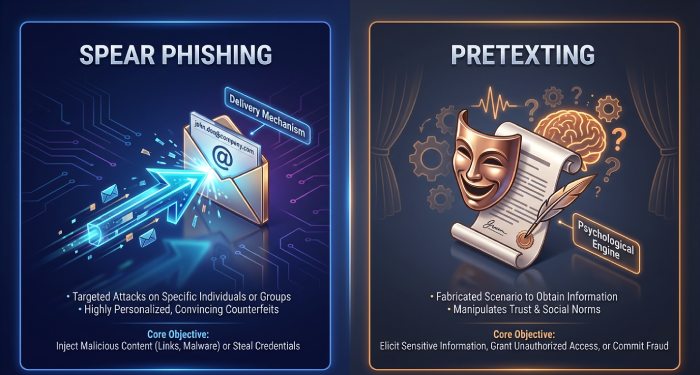
- Spear phishing: A targeted attack that uses tailored phishing emails aimed at a specific person or role. A spear phisher conducts target research to craft a personalized scam that elicits action, often to harvest login credentials, deliver malware, or authorize payments.
- Pretexting: A social engineering technique where an attacker fabricates a believable backstory (the pretext) to justify a request for sensitive information or money.
Differences
Spear phishing is best understood as the delivery mechanism—a phishing email optimized for a specific target—while pretexting is the psychological engine that powers the fraudulent message. Spear phishing often leverages details from social media and corporate websites, while pretexting perfects the scenario fabrication (for example, a vendor payment scam or a CEO fraud approval).
Overlap and Hybrid Attacks
Real campaigns blend both. A single targeted scam may use pretexting to impersonate a CEO and then deliver a spear-phishing link to a fake website that captures authentication details. Attackers extend these tactics across channels, such as SMiShing (SMS), vishing (voice), or a hybrid phishing attack that coordinates multiple touchpoints to validate the fraudulent email and intensify pressure.
How Attackers Exploit Trust: Cognitive Biases and Social Cues
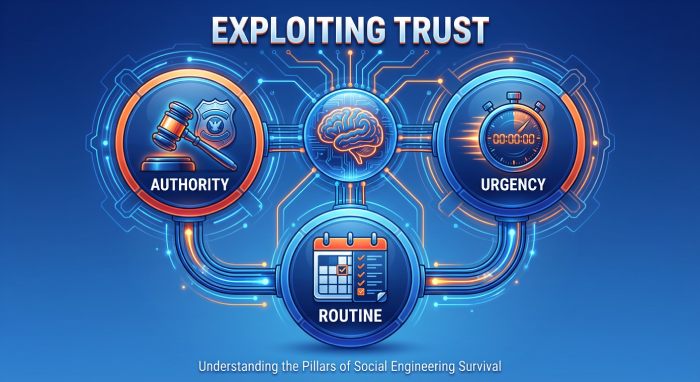
Authority, Urgency, and Routine
Pretexting exploits authority impersonation and urgent request themes (“Approve this now,” “Wire within 15 minutes”) to bypass rational scrutiny. By mimicking organization policy language and day-to-day processes, the phishing attack feels like routine work. Human error rises when a message appears to come from an internal threat (a compromised account) rather than an external threat.
Familiarity, Social Proof, and Context
Attackers engineer social engineering cues—names, meeting references, and timing. Pulling personally identifiable information from LinkedIn or a Think Newsletter signup, they build a trusted source narrative. The result is a fraudulent email that fits your calendar and your role, coaxing sensitive information, personal data, or confidential information out of busy recipients.
Artificial Intelligence and Message Quality
Artificial Intelligence and Generative AI now enable highly polished, AI-generated messages with fewer grammatical tells. Hackers can automate target selection, scenario fabrication, and language mirroring for a more convincing phishing email. This raises the bar for threat detection and increases the need for employee training to spot psychological manipulation even when the writing looks perfect.
The Targeted Email Kill Chain: Reconnaissance to Payout
Reconnaissance
A threat actor profiles people and processes:
- Roles: Finance Manager, HR Manager, C-level Executive.
- Vendors and workflows: “XYZ Systems Q3 support invoice,” or the ABC Industries company logo reused for credibility.
- Public data: org charts, social media trails, and job posts revealing network vulnerabilities or toolsets.
This target research helps the spear phisher choose the right attack process and align the fraudulent scenario with business rhythms.
Weaponization and Delivery
Attackers craft emails with:
- A spoofed email address and a believable display name.
- Attachments (for example, a Microsoft Word file) are laced with malware.
- Links to a fake website for credential harvesting.
They tune content to defeat a Spam filter, a secure email gateway, and a secure web gateway, while probing where Firewalls and Email Security Tools may be weakest.
Exploitation and Installation
Once the victim engages:
- Harvested login credentials enable account takeover, email account compromise, and lateral movement.
- Payloads install malware that can stage ransomware.
- Weak authentication is abused; robust identity and access management with multifactor authentication and role-based access control can blunt the blast radius.
Antivirus Software and advanced threat detection may still interrupt command-and-control, but timing is crucial.
Command, Monetization, and Cover
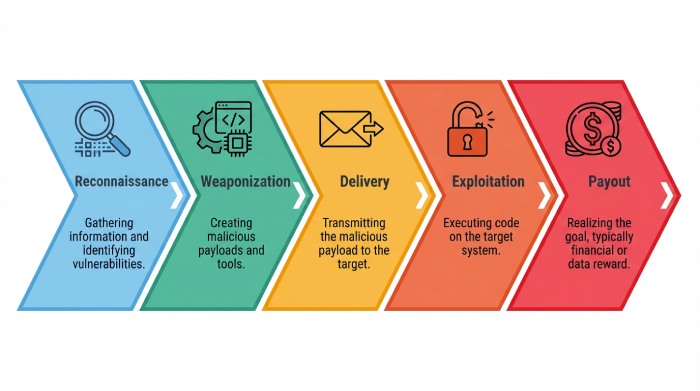
With footholds, attackers turn to payout:
- Business email compromise, whaling, or CEO fraud to authorize payments.
- A vendor payment scam using a fake invoice and updated “bank details.”
- Information theft of credit card numbers, personal data, or trade secrets, leading to bank account compromise and a data breach.
Cybersecurity Teams rely on layered security controls, IAM tools, and rapid response to contain damage and reduce security breach costs.
Anatomy of a Spear-Phishing Email: From Sender Spoofing to Payloads
Visual and Header Clues
Even refined phishing emails leave traces:
- Slightly altered domains and a spoofed email address.
- Misused branding (for example, the ABC Industries company logo in an external email).
- Inconsistent signatures or formatting from a “trusted source.”
Teach users to escalate a suspicious email rather than click. A quick call-back using known contacts—not reply-all—can stop a phishing attack before it spreads.
Content Hooks and Pretexts
Common pretexting cues include:
- Urgent request: “Wire $48,000 before cutoff.”
- Authority impersonation: “From: CEO; need confidential information immediately.”
- Process camouflage: “Final approval for Vendor XYZ Systems—see attached.”
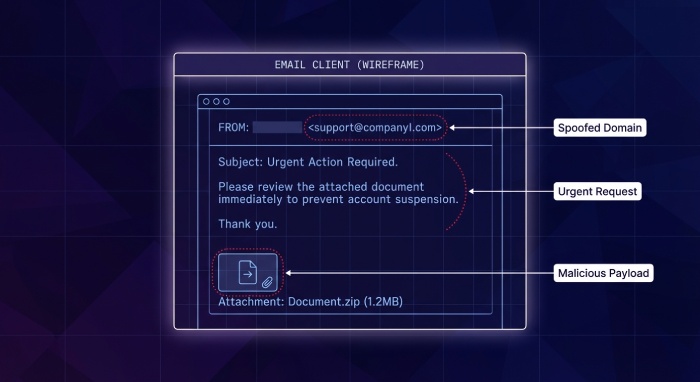
These cues drive psychological manipulation. The fraudulent message often references previous meetings or quotes organization policy to appear routine, coaxing sensitive information and personal data without raising alarms.
Attachments, Links, and Payloads
Payloads vary:
- Attachments in Microsoft Word or PDFs using macros or embedded scripts to deploy malware and stage ransomware.
- Links to a fake website imitating Single Sign-On to capture login credentials and trigger email compromise.
- Secondary channels (SMiShing or vishing) validate the fraudulent email in a hybrid phishing attack, making the targeted attack harder to dismiss.
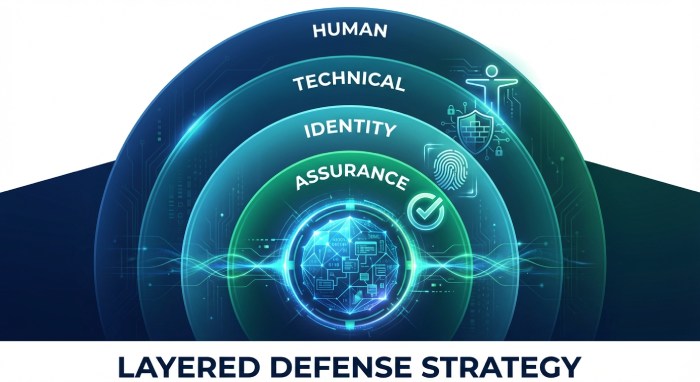
Practical Defense-in-Depth
- Human layer: Security Awareness Training, employee training, and recurring phishing simulation build muscle memory to challenge pretexting and spear phishing in daily emails.
- Technical layer: Email Security Tools, Secure Web Gateways, Firewalls, Antivirus Software, phishing protection, and advanced threat detection improve signal-to-noise and accelerate threat detection for a faster quarantine.
- Identity layer: Strong authentication with Multi-factor Authentication, identity and access management, and least-privilege via role-based access control limits the damage from stolen credentials.
- Assurance layer: A regularly scheduled Penetration Test helps validate controls and uncover process gaps before cybercriminals do.
Illustrative scenario: Jack, a Finance Manager at ABC Industries, receives a fraudulent email that appears to come from the CEO, referencing a legitimate project with Vendor XYZ Systems. The message includes a fake invoice link and an “updated bank account.” Because Jack spots the spoofed email address and flags the urgent request as unusual, the Spam filter and secure email gateway are engaged, Cybersecurity Teams investigate, and a data breach is averted.
References worth watching: IBM’s X-Force Threat Intelligence Index, Barracuda threat research, and the FBI Internet Crime Report all underscore the rising sophistication of spear phishing and pretexting. Pair those insights with modern AI defenses and strong organization policy to keep pace with evolving attackers.
Crafting the Pretext: Business Processes, Roles, and Lures
Mapping business workflows for scenario fabrication
Effective spear phishing begins with meticulous pretexting that mirrors actual business processes. Cybercriminals map approval chains, payment terms, and document flows to design a phishing attack that feels like routine work. They exploit social engineering to make fraudulent message threads and phishing email replies appear to come from a trusted source, using language found in past emails, purchase orders, or Microsoft Word templates.
This targeted attack often leverages data from LinkedIn, vendor portals, or the Think Newsletter to time the approach and to seed a believable fraudulent scenario.
Vendor lifecycle and invoice approval
In finance operations, a fake invoice remains a reliable lure. Attackers craft a phishing email with an attached invoice and reference ticket numbers, shipment IDs, or the ABC Industries company logo. They may register a domain that mimics a Vendor, or use a spoofed email address to request urgent payment, often paired with authority impersonation of a C-level Executive. The endgame can be information theft (e.g., bank details) or a link to a fake website that captures login credentials to enable account takeover and broader email compromise.
Red flags in a fake invoice pretext
- Unexpected “urgent request” for off-cycle payment
- Banking details change sent via emails without out-of-band verification
- Mismatched reply-to domain or subtle typos from a spoofed email address
Payroll, HR, and benefits hooks
Human resources manager workflows are exploited via “W-2 download,” benefits updates, or policy acknowledgments. These phishing lures push targets to enter personally identifiable information or sensitive information into cloned portals. Threat actors also use SMiShing and vishing to pressure staff during enrollment windows, mixing channels in a hybrid phishing attack.
Role-based lures and authority impersonation
Whaling and CEO fraud lean on psychological manipulation. A spear phisher tailors a personalized scam to a finance manager by invoking quarter-end close or a confidential acquisition. Pretexting draws from target research—org charts, press releases, even social media—to craft a targeted scam that bypasses Spam filter heuristics and email security rules.
C-level Executive and whaling tactics
- Executive travel pretexts: “Approve wire before wheels up.”
- Legal confidentiality: “Do not loop in others per counsel.”
- Board meeting rush: “Slides attached” that deliver malware or ransomware.
Content engineering and multi-channel hybrid phishing attack
Attackers blend AI-generated message content with real signatures. Artificial Intelligence and Generative AI help them generate polished emails, manipulate tone, and automate scenario fabrication at scale. Generative AI also fabricates “past thread” context and realistic attachments. This attack process often includes a second-stage fake website or a document macro to deploy malware, which can pivot to ransomware and a data breach, or harvest login credentials for email account compromise.
From emails to SMiShing and vishing
- SMS link to the MFA reset page for authentication theft
- Vishing callback to “IT desk” to divulge confidential information
- Follow-up emails that mirror internal ticket systems
BEC/VEC in Practice: Tactics and Industry Case Snapshots
Business email compromise and vendor payment scam patterns
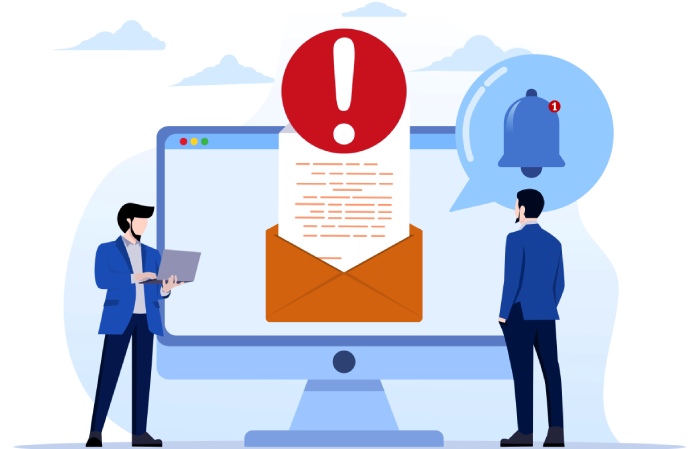
Business email compromise frequently starts with phishing emails that grab login credentials, leading to email account compromise and silent mailbox rules. Vendor email compromise (VEC) then injects a fraudulent email into a live payable thread—often a vendor payment scam aiming to divert funds. Attackers rely on authority impersonation and a trusted source appearance, combined with subtle content tweaks and a fake invoice.
Account takeover and email account compromise indicators
- Forwarding rules to external mailboxes
- Unapproved OAuth grants to rogue apps
- Unusual sign-ins triggering identity and access management alerts
Sector-specific targeted attack examples
- Professional services: document-sharing lures that deliver malware and capture sensitive information
- Manufacturing: fake shipment notices containing ransomware droppers
- Healthcare: benefits updates that solicit personal data and passwords
ABC Industries vs. XYZ Systems: a targeted scam
Jack, a Finance Manager at ABC Industries, receives a phishing email within a real vendor thread seemingly from XYZ Systems requesting a banking change. The spoofed email address contains a subtle domain swap. The fraudulent message includes a fake invoice PDF and a link to a portal that steals login credentials, enabling account takeover and a subsequent data breach of confidential information.
What the spear phisher got right
- Accurate target selection using LinkedIn org data
- Timing aligned to quarter-end cash runs
- Scenario fabrication that mirrored ABC’s approval process
Tools and trends used by threat actor groups
Reports like IBM’s X-Force Threat Intelligence Index and the FBI Internet Crime Report note the growth of AI-generated message content and advanced threat detection evasion. Barracuda and other Email Security Tools document how hackers chain pretexting with malware, then monetize via ransomware or wire fraud. Cybersecurity Teams must adapt security controls and threat detection to spot external threat campaigns and internal threat misuse.
Spotting Red Flags: Content, Technical Signals, and Context
Content cues inside a phishing email
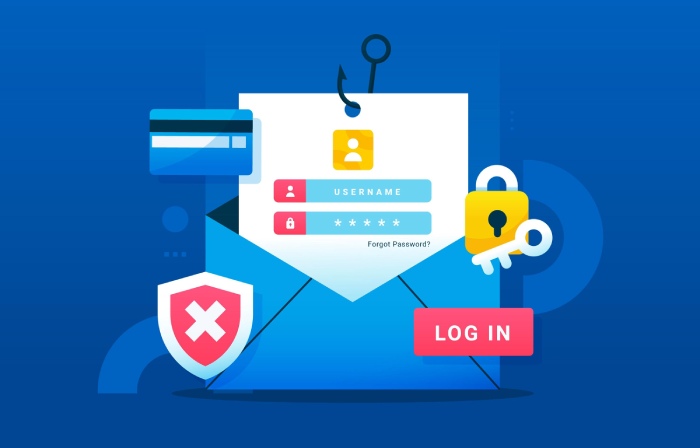
- Urgent request, secrecy, or authority impersonation
- Unexpected attachments or links to a fake website
- Payment/banking changes without a standard process
These patterns often indicate spear phishing or a broader phishing attack intent on information theft or bank account compromise. Treat every suspicious email as a potential targeted attack.
Technical markers and authentication gaps
- Missing or failing SPF, DKIM, or DMARC
- Newly registered look-alike domains
- Unfamiliar OAuth scopes or risky app consent
Lack of authentication alignment heightens email security risk; combine these with advanced threat detection and a secure email gateway for layered cybersecurity.
Contextual anomalies and human error traps
- Timing outside business hours
- Style or grammar shifts despite polished Microsoft Word formatting
- Requests that bypass organization policy or segregation of duties
Human error remains a leading cause of data breach exposure; security awareness training reduces the odds that personal data or sensitive information is mishandled.
Verification Playbooks: Out-of-Band Checks and Human-in-the-Loop Controls
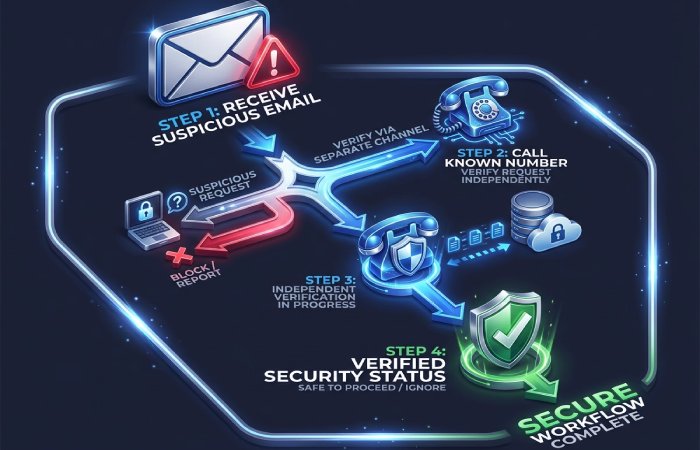
Call-back and secondary-channel validation
Establish a verification playbook: independently call the Vendor using a known number, not from the suspicious email. For payroll or banking changes, mandate out-of-band callbacks. Document each step to demonstrate due diligence and reduce the cost of a security breach after a phishing attack.
Segregation of duties and role-based access control
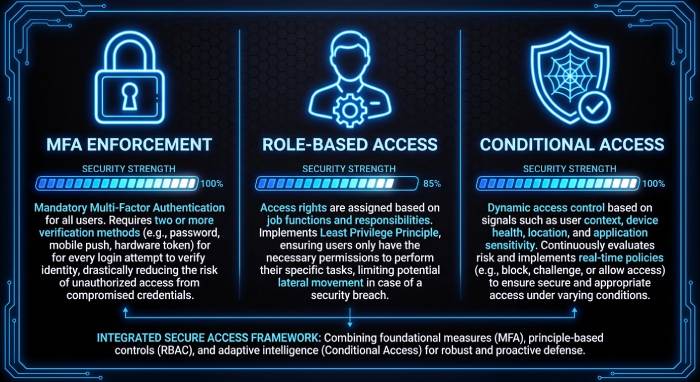
Use role-based access control to ensure no single Finance Manager can authorize and release high-value wires. Identity and access management (IAM tools) should enforce least privilege to reduce network vulnerabilities if login credentials are stolen.
Phishing simulation and employee training workflows
Regular phishing simulation, employee training, and Security Awareness Training reinforce detection of fraudulent email cues and social engineering. Include SMiShing and vishing scenarios, and measure improvement with metrics tied to phishing email reporting, not just click rates.
Email Authentication and Gateway Controls: SPF, DKIM, DMARC, BIMI, and Beyond
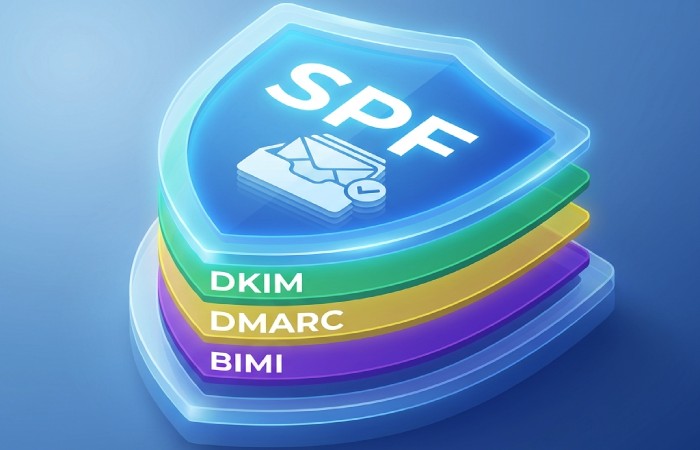
How authentication frameworks reduce spoofed email address abuse
- SPF validates sender IPs
- DKIM signs message integrity
- DMARC enforces policy alignment and reporting
- BIMI displays brand indicators, deterring impersonation
While not a silver bullet for spear phishing, alignment reduces fraudulent message delivery. Pair with DMARC reporting to track attack process trends and with BIMI to make legitimate emails visually trustworthy.
Secure email gateway, secure web gateway, and firewalls in concert
A secure email gateway, a secure web gateway, and Firewalls should integrate with Antivirus Software for layered threat detection. Sandboxing detonates attachments to spot malware and ransomware. Email Security Tools from vendors like Barracuda complement native controls, improving detection of hybrid phishing attack chains and preventing data breach fallout.
Advanced threat detection and sandboxing
Advanced threat detection uses behavioral analytics and Machine Learning to flag AI-generated message patterns. Combine this with a tuned Spam filter and URL rewriting to block fake website redirects. Penetration Test exercises can validate that security controls detect targeted attack tactics end-to-end.
Hardening Identity and Access: MFA, Conditional Access, OAuth/App Consent
Identity and access management guardrails
Identity and access management policies reduce the blast radius after email compromise. Enforce session timeouts, device posture checks, and geo-velocity rules. Integrate IAM tools with incident response so that account takeover triggers automated containment and authentication resets.
Multifactor authentication and conditional risk policies
Require multifactor authentication (MFA) and Multi-factor Authentication across all critical apps, including email. Conditional Access policies should challenge risky sign-ins, restrict legacy protocols, and flag impossible travel. This helps prevent CEO fraud and whaling that pivot on stolen login credentials and limits bank account compromise.
App consent governance and OAuth abuse
Lock down OAuth consent to pre-approved apps; scrutinize high-risk scopes and disable unused APIs. Monitor for anomalous app grants that follow spear phishing campaigns. Strong governance curtails external threat actors from using rogue apps for persistent access and confidential information exfiltration.
Notes:
- Coordinate with Cybersecurity Teams to update organization policy reflecting verified callback procedures and escalation for suspicious email content.
- Use IBM guidance and Barracuda research to tune detections; align to FBI advisories for business email compromise.
- Ensure Antivirus Software and Secure Web Gateways are current; review Email Security Tools coverage against AI-driven impersonation.
- Include C-level Executive sponsorship for funding and accountability; HR Manager co-owns employee training cadence.
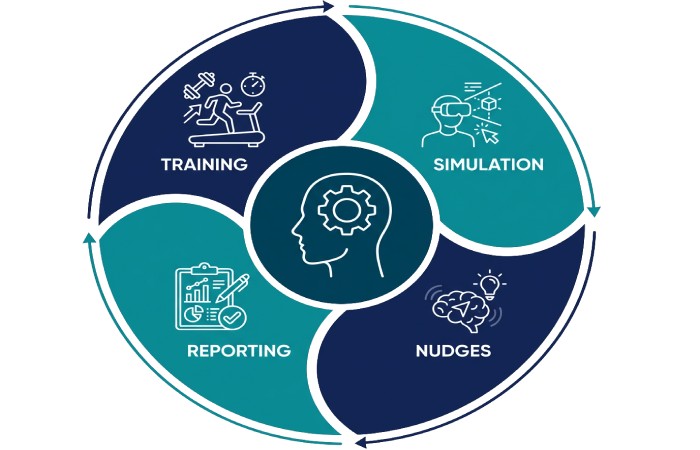
Human Defense-in-Depth: Training, Simulations, Nudges, and Culture
Security awareness training and employee training that actually changes behavior
Well-designed security awareness training turns every employee into a sensor for spear phishing and other forms of phishing. Modern curricula teach people to spot pretexting, authority impersonation, and the hallmarks of a phishing email—such as a spoofed email address, a fake invoice attachment, or an urgent request for login credentials or confidential information.
Role-tailored employee training for a Finance Manager and a human resources manager (HR Manager) is critical because these roles are prime targets for business email compromise, CEO fraud, and whaling, where a spear phisher crafts a targeted attack that feels like a trusted source.
Referencing data from the IBM X-Force Threat Intelligence Index and Barracuda research during training helps employees internalize the scale of phishing attacks, the rising use of social engineering, and the growing risk of a data breach.
Practical modules should include walkthroughs of a fraudulent email that spoofs a Vendor domain, a fraudulent message that attempts bank account compromise via a vendor payment scam, and a spear phishing pretext that uses LinkedIn details to request personally identifiable information and other sensitive information.
Training should also cover the downstream risks: malware and ransomware deployed by hackers after a phishing attack, information theft from email account compromise, and how a single click can expose personal data and trigger a costly cybersecurity incident. Reinforcing how emails can be weaponized across a hybrid phishing attack (email plus SMiShing or vishing) keeps vigilance high.
Behavioral nudges in emails and apps
- Just-in-time banners in emails flag risk indicators like unusual sender, spoofed email address, or new domain age. A secure email gateway and Spam filter can inject warnings that complement human judgment.
- Inline prompts in Microsoft Word and productivity tools can nudge users before enabling macros that may drop malware.
- Contextual tips inside collaboration apps reduce human error when a suspicious email or message requests sensitive information or authentication details.
Culture and leadership: From policy to practice
Leaders—especially a C-level Executive such as the CEO—must model healthy skepticism. Celebrate reported phishing email samples in town halls, publish an organization policy that prioritizes rapid reporting over blame, and assign clear ownership to Cybersecurity Teams. Tie expectations to performance goals so culture outlasts any one campaign.
Phishing simulations and exercises
A phishing simulation program validates readiness against spear phishing, pretexting, and targeted scam tactics. Rotate scenarios: a fake invoice from a known Vendor, a whaling attempt on a C-level Executive, and an AI-generated message that fakes a Think Newsletter subscription to harvest login credentials. Vary the attack process—target selection, scenario fabrication, and delivery—so employees experience the same psychological manipulation used by a real threat actor.
Leverage Security Awareness Training platforms and Email Security Tools to run drills that emulate authority impersonation and personalized scam messages. Use LinkedIn data (ethically and minimally) to mirror target research that spear phishers perform, highlighting how social media fuels impersonation.
Metrics that matter and reducing human error
Track report rate, click rate, credential submission attempts, and mean time to report. Risk-score departments, then prescribe micro-learning and additional controls for at-risk groups. After-action reviews should map which security controls or policies failed and how threat detection can be tuned in the secure email gateway or advanced threat detection stack.
Field example: ABC Industries drills a vendor payment scam
- Scenario: A fraudulent message to Finance Manager Jack at ABC Industries pretends to be from XYZ Systems with the ABC Industries company logo and a Microsoft Word “updated bank details” attachment.
- Signals: Spoofed email address, urgent request to change remittance, and pretexting referencing a recent order.
- Outcome: Jack reports the suspicious email; the secure email gateway sandboxes the attachment; no data breach occurs. The exercise clarifies organization policy, lowers the likelihood of account takeover, and demonstrates effective email security.
Responding to Suspected Phish: Triage, Containment, Forensics, Reporting
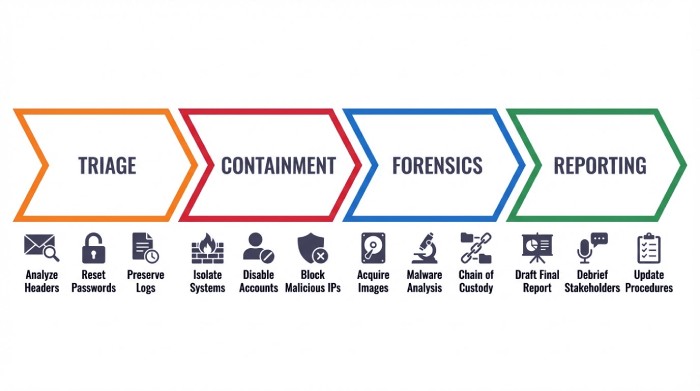
Triage: Rapid analysis of a suspicious email or message
- Verify sender and domain (SPF/DKIM/DMARC authentication), check for a spoofed email address, and inspect URLs for a fake website. Classify the phishing email by type: spear phishing, whaling, vendor payment scam, or malware delivery.
- Examine the pretexting elements, whether it’s an urgent request for sensitive information, a fraudulent scenario invoking a CEO, or an attachment that could drop ransomware.
- Use Email Security Tools, a secure email gateway, and advanced threat detection to detonate attachments and analyze links. Prioritize cases where login credentials, personal data, or confidential information may already be exposed.
Containment and eradication procedures
Once a phishing attack is confirmed, isolate endpoints via EDR, block indicators with firewalls and a secure web gateway, and scan systems with Antivirus Software. Force password resets, revoke sessions, and enforce multifactor authentication via IAM tools to prevent email account compromise or broader account takeover. Hunt for malware persistence and signs of information theft, credit card number theft, or bank account compromise. Where ransomware is suspected, disconnect affected hosts immediately and follow incident playbooks.
Forensics workflow and root-cause analysis
- Collect headers, payloads, and logs; preserve evidence; and analyze the attack process end-to-end.
- Identify initial access vector, pretexting patterns, and social engineering cues; map to network vulnerabilities discovered in a prior penetration test.
- Correlate with IBM and Barracuda intelligence and the Federal Bureau of Investigation advisory notes to improve ongoing threat detection and overall cybersecurity posture.
Reporting and external coordination
Report significant phishing to the FBI via the Internet Crime Report portal (IC3). Notify impacted customers if personal data or sensitive information was exposed, per organization policy and regulation. Sharing indicators with industry ISACs helps others mitigate similar targeted attacks by cybercriminals and reduces the chance of a cascading data breach.
Governance, Risk, Metrics, and Continuous Improvement
Policies, IAM, and layered security controls
Codify email security standards, identity and access management baselines, and role-based access control for high-risk workflows. Enforce Multi-factor Authentication on all external access to email, finance apps, and HR platforms. Periodically run a Penetration Test to uncover network vulnerabilities that could amplify damage from a phishing attack. Align controls with the attack surface: Email Security Tools, secure email gateway, Antivirus Software, Secure Web Gateways, and Firewalls, backed by IAM tools for rapid revocation when emails are abused in a targeted attack.
Risk metrics and an adaptive threat detection program
Maintain dashboards for phishing email volumes, spear phishing trends, time to quarantine, and data breach near-misses. Feed findings from phishing simulation and real incidents into rule updates and machine-learning models for advanced threat detection. Cybersecurity Teams should review the X-Force Threat Intelligence Index quarterly to anticipate new social engineering patterns and quantify security breach cost exposure for leadership decision-making.
What’s Next: AI-Boosted Phishing, Deepfakes, Cross-Channel Attacks, and a Practical Checklist
AI-boosted spear phishing and deepfakes
Artificial Intelligence and Generative AI enable a spear phisher to craft fluent, localized, and context-rich messages at scale. An AI-generated message can mirror a CEO’s tone, embed precise pretexting details, and dynamically customize fraudulent email content, accelerating targeted scam campaigns. Deepfake voice cloning fuels vishing that pressures employees to bypass authentication, while video deepfakes escalate authority impersonation—raising the stakes of every phishing attack and increasing the risk of malware payloads and ransomware detonation.
Cross-channel and hybrid phishing attack trends
Expect hybrid phishing attack chains that start with emails, pivot to SMiShing or social media DMs, then end with a phone call that seals the fraudulent scenario. Attackers blend internal threat and external threat narratives to confuse verification paths. Email compromise becomes a launchpad for broader impersonation, tricking partners and Vendors, leading to business email compromise and potential data breach across ecosystems.
A practical checklist you can use today
- Harden identity: Enforce multifactor authentication, least privilege, and role-based access control with IAM tools; monitor for email account compromise and account takeover.
- Boost email security: Deploy a secure email gateway, Email Security Tools, Spam filter, and sandboxing; block fake website links and detonate attachments to stop malware and ransomware.
- Train continuously: Schedule Security Awareness Training, role-specific employee training, and quarterly phishing simulation covering spear phishing, pretexting, whaling, and CEO fraud.
- Instrument detection: Integrate advanced threat detection, SIEM/SOAR playbooks, and alerting that prioritizes attempts to steal login credentials, personal data, or other sensitive information.
- Test and tune: Conduct a Penetration Test, validate security controls, and remediate network vulnerabilities revealed by exercises and incidents.
- Govern and communicate: Update organization policy, rehearse reporting to the FBI IC3, and brief C-level Executive sponsors and a Finance Manager/HR Manager on trends from IBM and Barracuda reports.
Key Takeaways
- Layer human defenses with training, simulations, behavioral nudges, and leadership-backed culture to counter spear phishing and sophisticated social engineering.
- Standardize triage, containment, and forensics to protect login credentials, personal data, and sensitive information and to minimize data breach impact.
- Govern with strong IAM, role-based access control, and tested security controls; measure outcomes and iterate using threat detection metrics.
- Prepare for AI-boosted, cross-channel attacks that blend emails, SMiShing, and vishing with deepfake-driven authority impersonation.
- Use a practical checklist: MFA, secure email gateway, phishing simulation, advanced threat detection, and regular penetration tests.