

Phishing prevention in 2026 demands renewed security awareness because adversaries blend social engineering with generative AI to industrialize online fraud. Attackers automate phishing campaigns, personalize messages at scale, and mirror brand voice, turning ordinary phishing emails into highly convincing, deceptive emails. Effective phishing attack prevention now hinges on layered security measures, robust phishing detection, and user education that helps people identify phishing attempts quickly.
Adaptive social engineering and generative AI
- AI models craft fluent, localized phishing scams with correct grammar and context, making traditional red flags harder to spot.
- Real-time chatbots on spoofed sites coach victims to surrender login credentials, undermining scam prevention and consumer protection efforts.
- Deepfake voice and video enhance vishing, pressuring targets to act on “urgent” instructions tied to payroll, invoices, or bank security alerts.
Deepfake voice/video and real-time chatbots
- Voice clones impersonate executives, support agents, or a financial institution to accelerate account security compromises.
- Attackers stage live chats to “verify sender” identity, creating plausible secure communication while harvesting personal information protection data.
Supply chain and API impersonation
Phishing threats now target APIs and vendor portals. Website spoofing includes cloud, HR, and ticketing logins to steal OAuth tokens, not just passwords. This raises the stakes for IT security and informatics security as organizations expand authentication methods and API/app controls for phishing attack prevention.
QRishing, MFA fatigue, and evolving payloads
- QR codes in lobbies, invoices, and packaging route to malicious links that sidestep desktop URL defenses.
- MFA fatigue “push bombing” floods users with approval prompts until one is accepted. Strong multifactor authentication choices and awareness training are key phishing prevention best practices.
- While macro malware declined, HTML smuggling, QR-based redirects, and mobile smishing surged, compounding email phishing with cross-channel cyberattacks.
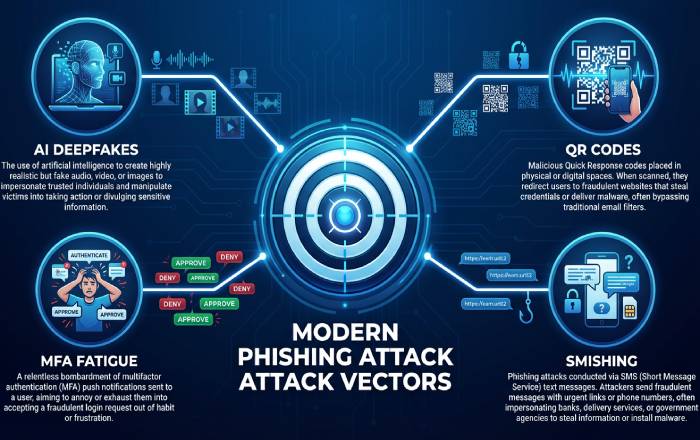
Channels and attack types to recognize: email, SMS, social media, QR codes, vishing, and MFA fatigue
A core element of phishing detection is knowing where and how attacks arrive. Train for alertness across channels and build muscle memory to avoid phishing in the moment.
Email phishing essentials
Email phishing remains the top entry point for online fraud. Attackers weaponize:
- Fraudulent emails posing as support, payroll, or delivery services.
- Deceptive emails with lookalike domains and display-name spoofing.
- Links in emails that redirect through multiple trackers to mask the destination.
- Email attachments (HTML, PDF, ZIP) that deliver credential harvesters or malware.
Indicators to watch
- Mismatched sender domains and reply-to addresses.
- Urgent requests for login credentials or payment changes.
- Website spoofing via punycode or homoglyph domains.
- Odd tone, unexpected email attachments, or unusual requests outside security policies.
Smishing and social media DMs
Smishing blends SMS urgency with short URLs to bypass traditional spam filters. On social platforms, direct messages impersonate colleagues or HR to kick off phishing attempts. Treat shortened URLs as suspicious activity and use out-of-band checks before engaging.
QR codes, vishing, and MFA fatigue
- QR codes on posters, tickets, or invoices can route to phishing emails’ landing pages tailored for mobile. Inspect the URL preview when possible.
- Vishing leverages caller ID spoofing and deepfake audio; never disclose sensitive data over a call you did not initiate.
- Push-based MFA fatigue exploits habituation. Adopt phishing-resistant authentication methods (e.g., FIDO2 passkeys with on-device verification) to harden account security.
Spotting the telltale signs: red flags, link and domain checks, and safe verification workflows
Phishing prevention improves when people can quickly identify phishing and follow repeatable workflows to avoid phishing traps. Combine best practices with consistent security tips that emphasize consumer protection.
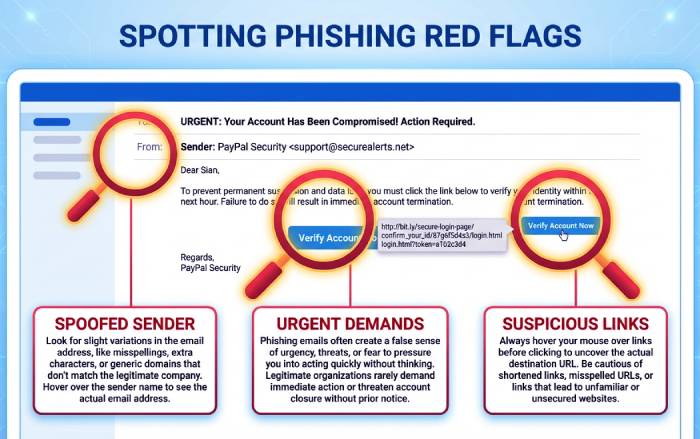
Red flags and phishing indicators
- Unexpected password resets, invoices, or prize notices.
- Payment instructions change from a vendor without prior notice.
- Requests for gift cards, crypto, or urgent wire transfers.
- Login portals that load slowly, lack HTTPS, or ask for atypical data protection fields.
Link and domain inspection
- Hover over links in emails to inspect full URLs; look for misspellings, extra characters, or nonstandard TLDs.
- Use a separate browser profile to test suspicious links in a sandboxed environment.
- When in doubt, navigate directly to the official site rather than following embedded links in emails.
Verify sender and secure communication
- Call a known number from your records (not the message) to validate changes. This out-of-band step is vital to scam prevention.
- For bank security or policy changes, contact the financial institution using numbers from a statement or the official site.
- If you encounter suspicious activity, capture headers and report phishing to your security team or provider to enable faster incident response.
Safe workflows that protect information
- Never email login credentials or MFA codes. Use approved secure communication channels.
- Limit data exposure on forms; provide only what is necessary for protecting information and personal information protection.
Personal security hygiene: passwords, passkeys, MFA choices, device/browser updates, and safe browsing habits
Stronger individual hygiene underpins phishing attack prevention and overall cybersecurity. These best practices raise the cost for attackers and reduce online fraud.
Password protection, passkeys, and MFA
- Prefer passkeys where available; they resist phishing scams by binding authentication to the legitimate domain.
- If passwords persist, use password protection via a manager, unique phrases, and change passwords after exposure.
- Use multifactor authentication, prioritizing phishing-resistant options (FIDO2, WebAuthn) over SMS codes.
Device security, browser security, and updates
- Update software automatically on OS, browsers, and plugins to close exploit windows.
- Enable safe browsing features, isolate work and personal profiles, and keep extensions minimal for device security.
- Turn on browser security warnings for malicious links and certificate errors; these are practical security measures.
Practical security tips
- Enable monitoring accounts for unusual logins and transactions.
- Lock screens, encrypt devices, and back up data as core data protection steps.
- Practice alertness: pause before clicking, verify sender identity, and think through the request path.
Security awareness and user education
- Regular awareness training builds intuition to identify phishing across new lures.
- Keep a personal checklist for phishing indicators and a plan to report phishing quickly.
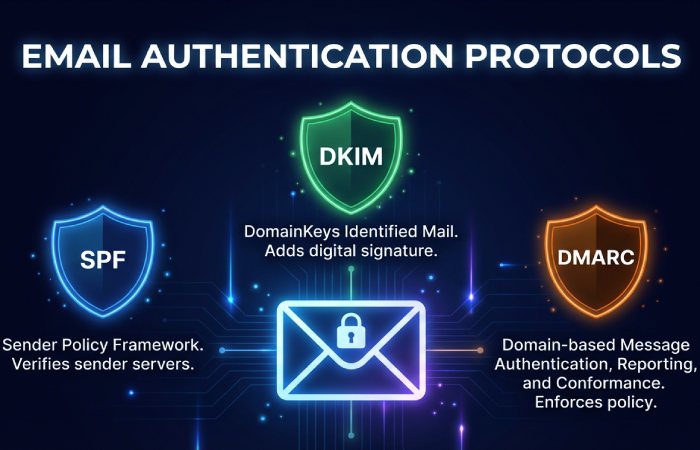
Organizational defenses: email authentication (SPF/DKIM/DMARC), MTA-STS/TLS-RPT, BIMI, sandboxing, DNS filtering, and API/app controls
Enterprises need layered email security and risk management tuned for modern phishing campaigns. Combine technical controls with policies and continuous phishing detection to avoid phishing losses at scale.
Authentication and transport security
- Enforce SPF, DKIM, and DMARC at p=reject to block domain spoofing; pair with BIMI for brand trust signals.
- Deploy MTA-STS and TLS-RPT to enforce encrypted mail delivery and gain visibility into failures that may signal phishing attempts or downgrade attacks.
- Apply strict inbound email security rules for lookalike domains and newly registered domains.
Detection, sandboxing, and DNS controls
- Use advanced spam filters with machine learning to flag phishing emails and fraudulent emails, detonate attachments in sandboxing, and rewrite or block malicious links.
- Implement DNS filtering, browser isolation for high-risk categories, and CASB/SSPM to monitor SaaS session anomalies.
- Instrument API/app controls to detect token theft, impossible travel, and suspicious activity patterns across sessions.
Policies, training, and response
- Maintain written security policies for acceptable use, secure communication, and report phishing workflows.
- Run awareness training, executive vishing drills, and tabletop exercises for incident response.
- Align IT security with authentication methods (passkeys, conditional access), least privilege, and continuous monitoring to bolster phishing protection and consumer protection.
Finance-sector fraud resources and regulatory touchpoints
For regulated entities and consumers seeking fraud resources:
- The Office of the Comptroller of the Currency (OCC), a U.S. government regulator of national banks, publishes Bulletins, the Comptroller’s Handbook, and an Annual Report with supervisory themes relevant to phishing attack prevention and bank security.
- OCC’s HelpWithMyBank.gov offers consumer protection guidance on scams and account issues, while BankNet.gov supports bankers with supervisory materials.
- Related references include the Community Reinvestment Act, Bank Secrecy Act, Dodd-Frank Act, and SAR Program, which inform risk management and reporting.
- Institutions can consult OCC Newsroom and Media Resources, Enforcement Action Search, and CAS (Corporate Applications Search); FOIA, OCC Alumni, and Whistleblower Reporting portals provide additional transparency and channels. These fraud resources complement organizational security measures and reinforce best practices that help identify phishing and reduce online fraud across the financial institution ecosystem.
Zero Trust in practice: least privilege, conditional access, device trust, and session protection against token theft
Enforcing least privilege and just-in-time access
Adopt least privilege as a cornerstone of phishing attack prevention by granting the minimum entitlements required and expiring elevated roles quickly. Just-in-time admin workflows, access reviews, and scoped roles reduce blast radius from phishing emails or deceptive emails that harvest login credentials. Pair these security measures with continuous authorization to improve phishing detection and prevent lateral movement.
Practical authorization patterns
- Use role- and attribute-based access control plus approval workflows for sensitive data protection and personal information protection.
- Apply session-based controls that restrict data export, printing, or screen capture to help avoid phishing-led exfiltration.
- Rotate secrets, enforce password protection standards, and require multifactor authentication as the default authentication method.
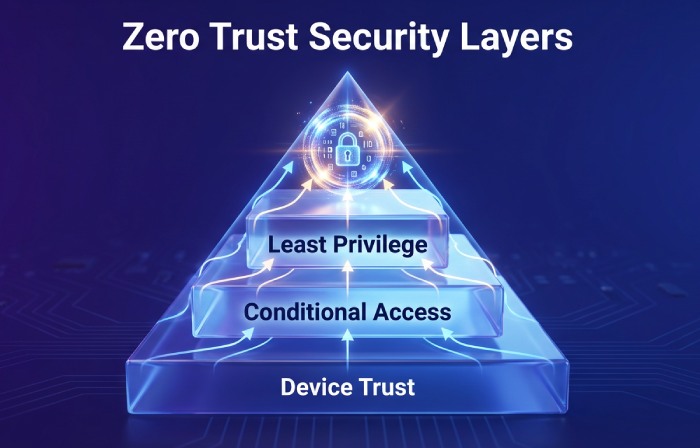
Conditional access policies that respond to risk
Conditional access links authentication to real-time risk signals, hardening phishing prevention. Trigger step-up MFA, limit access to read-only, or block sessions when suspicious activity is detected (impossible travel, TOR exit nodes, malicious links previously seen in phishing campaigns). These best practices raise security awareness at the point of use and help identify phishing before damage occurs.
Signals: device posture, geolocation, impossible travel
- Evaluate device trust (MDM-registered, encrypted, compliant OS) and browser security posture.
- Use geofencing and network heuristics to flag phishing threats and online fraud attempts.
- Invoke continuous access evaluation to revoke tokens on policy changes or high-risk events.
Device trust and browser security baselines
Harden endpoints to support phishing attack prevention: enforce update software cadences, application allowlists, and device security baselines. Browser security settings (site isolation, safe browsing, download controls) reduce exposure to website spoofing and malicious links. Combine DNS filtering and spam filters to prevent email phishing sites from loading and to bolster information security.
Session protection against token theft
Defend against session hijacking with token binding, secure cookie flags, conditional token issuance, and re-authentication on sensitive actions. Monitor session anomalies and require MFA for privilege elevation; short token lifetimes plus sign-out on posture changes limit fallout from phishing attempts. These layered controls are Zero Trust best practices for phishing detection and scam prevention.
Training that changes behavior: simulations, role-based scenarios, microlearning, and actionable metrics
Continuous simulations and phishing detection drills
Run adaptive simulations that mirror real phishing scams, smishing, and vishing to raise alertness. Include realistic links in emails, convincing email attachments, and spoofed domains so employees can identify phishing patterns and report phishing quickly. Tie outcomes to consumer protection objectives and online fraud reduction.
Metrics that matter for phishing prevention
Track time-to-report, repeat clickers, dwell time, and completion of awareness training. Measure false-positive reports to fine-tune security tips and reduce alert fatigue. Use metrics to target coaching, demonstrating tangible phishing attack prevention improvements.
Role-based training for high-risk teams
Tailor user education for finance, HR, IT security, and executives using role-based scenarios that reflect payment fraud and social engineering. Teach phishing indicators such as mismatched domains, urgent transfer requests, and unusual bank security instructions. Emphasize secure communication protocols for approvals to avoid phishing-driven Business Email Compromise.
Microlearning and nudges for security awareness
Deliver 3–5 minute modules inside daily tools that reinforce best practices, email security, and protecting information. In-product nudges remind users to verify sender, hover to preview URLs, and escalate suspicious activity. This cadence builds durable cybersecurity habits and strengthens phishing prevention across the organization.
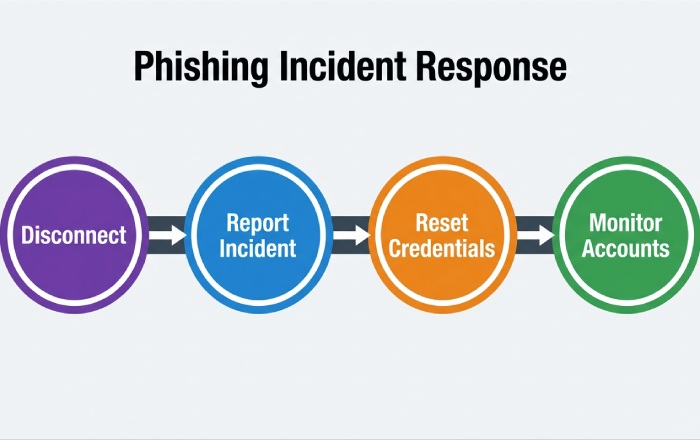
Incident response playbook: what to do if you click, containment steps, credential resets, and reporting
Immediate actions to contain suspicious activity
If you interacted with phishing emails or fraudulent emails, disconnect from networks, capture evidence, and notify the incident response team. Quarantine the device, revoke sessions, and invalidate API keys to curb cyberattacks. Begin monitoring accounts for anomalous transactions to support consumer protection and risk management.
Credential resets and authentication methods
Reset login credentials, change passwords, and enforce multifactor authentication re-registration with phishing-resistant methods (FIDO2, passkeys). Rotate tokens, certificates, and recovery factors; verify device health before restoring access. These security policies limit account security compromise and support data protection.
Systematic incident response and escalation
Follow a documented incident response plan: triage, contain, eradicate, recover, and review. Use secure communication channels for coordination; enrich IOCs from phishing emails and phishing attempts to strengthen phishing detection rules. Update software baselines and security measures based on lessons learned.
How to report phishing and leverage fraud resources
- Employees and consumers should report phishing to security and, when applicable, to the U.S. government at reportphishing@apwg.org and ftc.gov/complaint; financial crimes may warrant filing with IC3.gov.
- For banks, align with the Bank Secrecy Act, SAR Program (via FinCEN), and your Financial Institution’s procedures; consult the Office of the Comptroller of the Currency (OCC) guidance, Comptroller’s Handbook, and OCC Bulletins.
- OCC resources: HelpWithMyBank.gov for consumer protection and fraud resources; BankNet.gov for supervised institutions; Enforcement Action Search, CAS (Corporate Applications Search), FOIA, Newsroom, Media Resources, Annual Report, OCC Alumni, and Community Reinvestment Act and Dodd-Frank Act materials for broader compliance context.
- Use Whistleblower Reporting channels when appropriate. These fraud resources inform scam prevention and strengthen bank security governance.
Securing remote and mobile work: BYOD/MDM, ZTNA vs VPN, Wi‑Fi safety, and collaboration platform protections
BYOD, MDM, and device security posture
Adopt MDM or enterprise mobility management to enforce encryption, lock screens, and app vetting on BYOD. Conditional access should require compliant devices to reach email phishing targets like inboxes, reducing exposure to phishing scams. Clear security policies delineate corporate vs personal information protection and protect information boundaries.
ZTNA vs VPN for secure communication
Prefer Zero Trust Network Access over flat VPNs to limit lateral movement and support phishing attack prevention. ZTNA brokers per-app access with strong authentication methods and context, improving phishing prevention and overall cybersecurity. Maintain least-privilege routes and mutual TLS for secure communication.
Wi‑Fi hygiene and browser security
Educate users with security tips: avoid open Wi‑Fi, use DNS-over-HTTPS, and enable browser security features. Block risky downloads, inspect TLS certificates, and warn on website spoofing to help users avoid phishing. These best practices reduce online fraud and complement email security controls.
Collaboration and email security controls
Harden collaboration suites with DLP, link rewriting, sandboxing for email attachments, and banner warnings on external senders. Layer spam filters, DMARC/DKIM/SPF, and anomaly detection to surface phishing indicators and phishing threats. Automated prompts to report phishing keep security awareness high.
Protecting high-value targets and supply chains: executive/BEC safeguards, payment approvals, and vendor verification
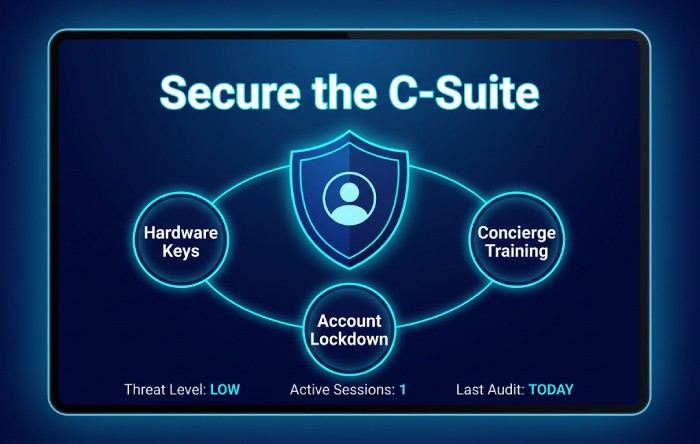
Executive protection and account security
Executives face targeted phishing campaigns and social engineering; enforce hardware security keys, travel policies, and delegated approvals. Lock down account recovery, remove legacy protocols, and apply tailored monitoring account rules to improve phishing detection. Provide concierge user education and awareness training for continuous security awareness.
Payment approvals and out-of-band verification
Institutionalize callback verification on payment changes, with numbers sourced independently to avoid phishing traps. Require dual authorization and cryptographic approval for high-value transfers—core best practices for scam prevention and consumer protection. Store procedures centrally so staff can identify phishing signals in urgent payment requests.
Vendor and supply chain risk management
Validate vendor domains, banking details, and tax records; run vendor verification before onboarding and on change events. Use continuous risk management with third-party monitoring to catch website spoofing, domain typos, and fraudulent emails. Coordinate with your Financial Institution partners for bank security checks and secure communication on disbursements.
Detecting website spoofing and fraudulent emails
Train staff to spot subtle domain swaps, mismatched reply-to fields, and suspicious activity in headers. Warn about links in emails that redirect to credential-harvesting portals and inspect email attachments in sandboxes. These layered defenses enhance phishing prevention and broader cybersecurity against online fraud.
Key Takeaways
- Zero Trust controls—least privilege, conditional access, device trust, and session protections—materially reduce exposure from phishing emails and online fraud.
- Behavior-changing training with simulations, role-based content, and microlearning elevates security awareness and speeds reporting of phishing actions.
- A clear incident response playbook—with containment, resets, and regulatory fraud resources—improves phishing detection and consumer protection outcomes.
- Remote work security hinges on MDM/BYOD policies, ZTNA, Wi‑Fi hygiene, and hardened collaboration/email security controls.
- Executive and supply chain safeguards—vendor verification and out-of-band payment approvals—are essential best practices for phishing prevention and scam prevention.