

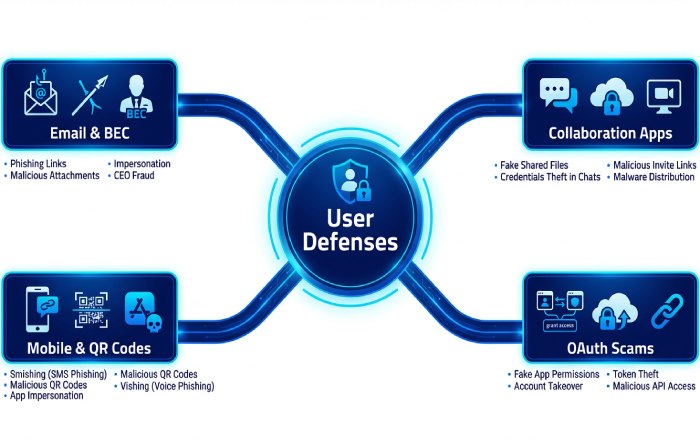
Modern attackers continue to pivot faster than controls evolve, which is why O365 phishing protection remains a top priority for Office 365 security teams in 2026. Business Email Compromise (BEC) campaigns now blend executive impersonation with invoice tampering and supplier fraud. MFA fatigue and push-bombing bypass weak sign-in habits, while QR code “quishing” evades URL scanners by offloading payloads to mobile devices.
OAuth consent abuse targets Entra ID app registrations to persist access to cloud mailboxes and data in Microsoft 365, Azure, Dynamics 365, and Power Platform. Meanwhile, Teams-based lures exploit chat trust and link previews to initiate drive-by credential theft.
- Effective anti-phishing protection starts with layered email security, but must extend to collaboration and identity to cover Microsoft Teams, Outlook, and Office online surfaces.
- Strong email authentication (SPF, DKIM, DMARC) and anti-spoofing protection reduce exact-domain spoofing, but adversaries still favor lookalike domains and compromised partners.
- Microsoft’s unified signals across Microsoft Defender XDR improve threat classification for BEC and OAuth consent phishing that don’t carry malware.
In short, O365 phishing protection must protect human-in-the-loop workflows and cloud mailboxes wherever users work, on Windows or mobile, and inside Teams channels as much as in traditional email.
Signals and visibility that matter in 2026
- Cross-domain telemetry from Microsoft Defender for Office 365, Defender for Endpoint, Defender for Identity, and Defender for Cloud Apps correlates user and device risk for sharper phishing policies.
- Incident response speed depends on monitoring, alert policies, audit log search, and message trace to follow attacker movement across mail, Teams, and SharePoint.
2026 shift: From detection to guidance
Security teams need embedded security recommendations informed by configuration analyzer checks and SecOps guide patterns, turning detection into rapid containment within cloud organizations running Microsoft 365.
How Microsoft’s protection stack and licensing fit together: EOP, Defender for Office 365 (Plan 1/Plan 2), Microsoft 365 Defender, and Entra ID
Exchange Online Protection: your baseline filter
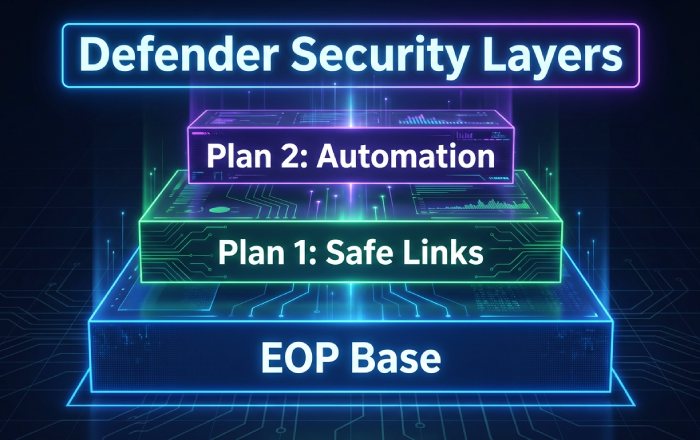
Exchange Online Protection (EOP) provides connection filtering, malware scanning, and outbound spam protection for all cloud mailboxes. It underpins Office 365 security with transport rules, quarantine, and exchange mail flow rules to enforce allow and block decisions. EOP integrates with mail flow connectors for hybrid and third-party gateways, and surfaces foundational reports for visibility.
Defender for Office 365 Plan 1 vs Plan 2
Microsoft Defender for Office 365 (Plan 1) adds Safe Links, Safe Attachments, and basic real-time detections for stronger email security. Plan 2 layers of advanced anti-phishing protection with anti-phishing policies, investigation and response automations, attack simulation training, threat explorer, and detailed threat policies. Whether you refer to it as Defender for Office 365 or Microsoft Defender for Office 365, it is the central control plane for O365 phishing protection in cloud mailboxes and collaboration apps.
- Plan 1: Core Safe Links, Safe Attachments, time-of-click checks, and ZAP.
- Plan 2: Mailbox intelligence, impersonation insight, threat policy settings, automation, and advanced hunting.
Microsoft 365 Defender (Defender XDR) unifies response
Microsoft Defender XDR correlates email, endpoint, identity, and SaaS signals to accelerate incident response. It pairs Defender for Office 365 with Microsoft Defender for Endpoint, Microsoft Defender for Identity, Microsoft Defender for Cloud Apps, Microsoft Defender Vulnerability Management, and Microsoft Defender for Cloud. The broader Defender Suite even spans Microsoft External Attack Surface Management and Microsoft Defender for IoT to expose risky assets that attackers may pivot through. Security Copilot features in Microsoft Copilot for Security offer guided triage to analysts.
Entra ID (Azure AD): identity guardrails
Entra ID enforces zero trust controls that blunt phishing outcomes: Conditional Access, token protections, and granular consent policies. Use OAuth consent settings and consent workflows to limit risky app grants, apply tenant restrictions for third-party apps, and review priority accounts with stricter session and sign-in policies. Combine with delegated administration guardrails to protect MSP and helpdesk roles.
Baseline hardening with Preset Security Policies (Standard/Strict), policy scoping and priority, and safe defaults
Standard and Strict presets as safe defaults
Preset security policies in Defender for Office 365 deliver Microsoft-curated, up-to-date configurations mapped to evolving threats. Standard and Strict configurations enforce Safe Links and Safe Attachments, anti-phishing policies, and threat policies for common attack paths. Because these preset security policies inherit security updates and best-practice changes, they are a reliable foundation for Office 365 security across cloud mailboxes.
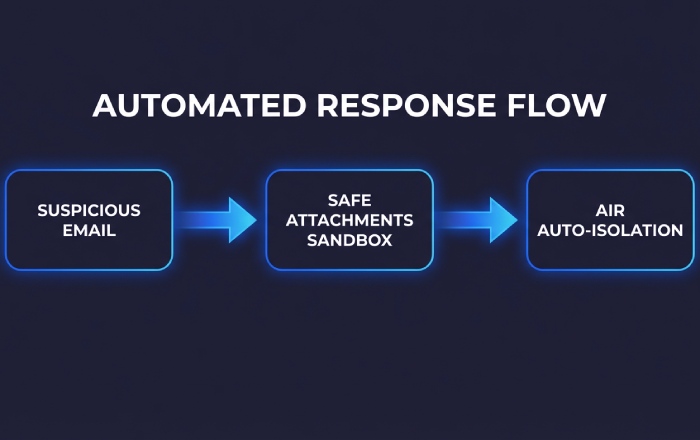
- Apply preset security policies to all users first; then add exceptions.
- Use security recommendations from the configuration analyzer to close gaps that the presets reveal.
Scoping, precedence, and advanced delivery
Policy order matters. Assign preset security policies broadly, then layer custom anti-phishing policies, Safe Links, and Safe Attachments rules with narrower scopes (e.g., VIPs, departments). Use an advanced delivery policy to ensure security tools, third-party simulations, or external scanners are correctly classified, avoiding false positives in threat classification.
Validate with continuous assessment
- Review security policies, threat policy settings, and reports monthly to adapt to new TTPs.
- Confirm that allow and block entries are minimal and justified.
- Leverage audit log search and message trace to verify that Safe Links and Safe Attachments are firing as expected.
Advanced anti-phishing policies: impersonation protection (VIPs, domains), mailbox intelligence, user/domain impersonation, and spoof intelligence
Impersonation protection for VIPs and domains
Create targeted anti-phishing policies with priority accounts (executives, finance) and protected domains. Turn on mailbox intelligence so the system learns trusted sender patterns. Use impersonation insight to surface lookalike user and domain attempts that bypass simple email authentication checks. Pair with alert policies to notify SecOps when BEC indicators spike.
Spoof intelligence and anti-spoofing protection
Enable spoof intelligence to manage legitimate cross-tenant or third-party senders that fail authentication. Maintain anti-spoofing protection to harden against display-name and cousin-domain attacks. If your team needs quick references, rely on Microsoft’s spoofing protection FAQ and security documentation for edge cases and step-by-step guides.
Policy tuning and operational hygiene
- Periodically export threat policies and security policies; use the configuration analyzer for drift detection.
- Integrate with Exchange mail flow rules and mail flow connectors only when necessary—prefer native anti-phishing protection first.
- Validate outcomes via quarantine review, audit log search, message trace, and incident response playbooks.
Governance essentials
Maintain compliance by documenting exceptions, running security training and attack simulation training, and tracking effectiveness in reports. Establish monitoring routines for cloud organizations so policy changes are measured and reversible.
Safe Links and Safe Attachments across email and collaboration: configuration, exceptions, dynamic delivery, ZAP, and time-of-click protection (Outlook, Office, Teams)
Core configuration and exceptions
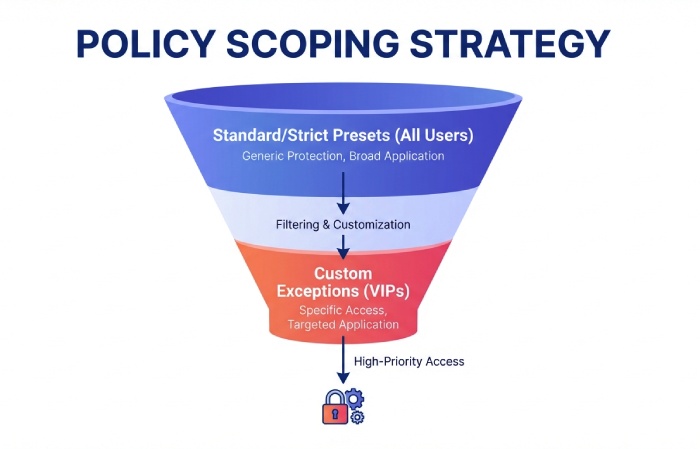
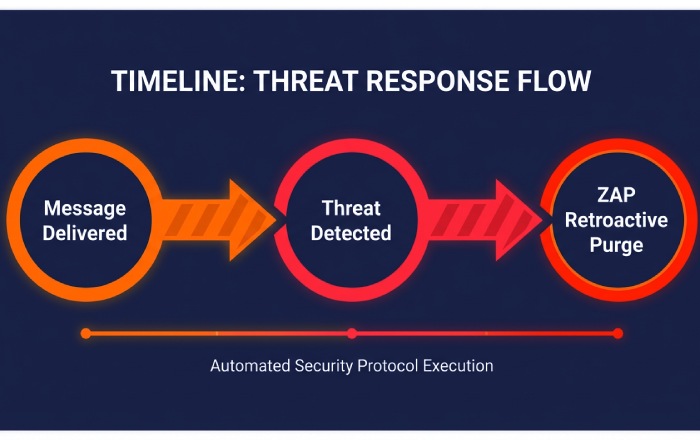
Safe Links and Safe Attachments are the backbone of O365 phishing protection beyond gateways. Configure Safe Links for time-of-click protection in Outlook on the web, Outlook for Windows, Office online, and Microsoft Teams; extend to URLs in Office documents. For Safe Attachments, enable dynamic delivery so users receive messages quickly while attachments are detonated in sandboxes. ZAP retroactively removes malicious content discovered post-delivery—critical for fast-moving campaigns.
- Use policy exceptions sparingly for trusted automation or approved testing.
- Align Safe Links and Safe Attachments scopes with preset security policies, then refine with custom phishing policies.
Collaboration and device-aware defenses
Enable Teams protection so links posted in chats and channels inherit Safe Links. Turn on safe documents so Office files from the internet open in Protected View and are scanned using Defender for Endpoint signals on Windows. Where OAuth risks intersect with file sharing, use Microsoft Defender for Cloud Apps to govern suspicious apps and session behavior.
Reporting, troubleshooting, and resilience
- Track detections and user impact via reports, quarantine dashboards, and alert policies.
- Use message trace to confirm ZAP actions; verify outcomes with audit log search.
- Publish internal security recommendations to reinforce secure behaviors and update them with each monthly security update cycle.
Building connected defenses
When Microsoft Defender for Office 365 is paired with Defender XDR products, policy hits from Safe Links, Safe Attachments, and anti-phishing policies feed a unified incident. That accelerates response workflows with automated containment and guided investigation from security copilot features. Extend visibility to assets discovered by Microsoft External Attack Surface Management and harden internet-facing services monitored by Defender for Cloud and Defender for Business.
Authentication and domain protection: SPF, DKIM, DMARC, ARC, alignment, and monitoring spoof sources without risky bypasses
SPF, DKIM, and DMARC alignment as the foundation
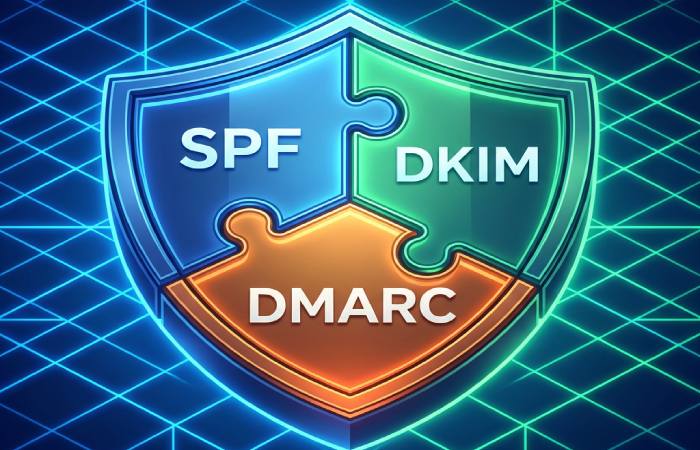
Strong email authentication is non-negotiable for modern email security. Publish Sender Policy Framework (SPF) records that enumerate all legitimate sending hosts, sign all outbound mail with DomainKeys Identified Mail (DKIM), and enforce Domain-based Message Authentication, Reporting and Conformance (DMARC) with alignment. In Microsoft Defender for Office 365, aligned DMARC significantly boosts anti-phishing protection efficacy and improves Office 365 phishing protection outcomes across cloud mailboxes.
Alignment requirements and subdomain strategy
- Ensure both SPF and DKIM align with the visible From domain to satisfy DMARC. If third-party platforms send on your behalf, coordinate DKIM keys and include sending IPs in SPF to maintain alignment without transport rule bypasses.
- Use organizational and subdomain DMARC policies strategically (p=quarantine or p=reject), raising enforcement as authentication confidence grows per security recommendations and threat policies.
ARC and forwarding ecosystem
Authenticated Received Chain (ARC) preserves upstream authentication when messages are forwarded through list servers and gateways. Enable ARC in Office 365 security to reduce false positives in anti-phishing policies while keeping strict email authentication signals intact.
ARC, indirect mail, and third-party senders
Many cloud organizations rely on marketing platforms, ticketing systems, or CRM tools across Azure, Dynamics 365, and Power Platform. Work with providers to implement DKIM and DMARC, and document flows with mail flow connectors. For indirect mail paths, ARC helps Defender for Office 365 retain threat classification context, ensuring Safe Links, Safe Attachments, and safe documents decisions remain accurate post-forward.
Monitoring spoof sources without bypasses
Use spoof intelligence, impersonation insight, and threat explorer data to learn which domains are most abused. Avoid broad allow and block exemptions or exchange mail flow rules that skip filtering; instead, manage exceptions with Tenant Allow/Block List and advanced delivery policy for controlled coexistence. Continually review configuration analyzer, anti-spoofing protection guidance, and the spoofing protection FAQ to harden configurations while sustaining anti-phishing protection and O365 phishing protection across cloud mailboxes.
Signal tuning and governance
- Apply preset security policies to fast-track recommended anti-phishing policies, Safe Links, Safe Attachments, and threat policies.
- Audit DMARC aggregate reports and message trace to spot new spoof vectors; adjust connection filtering and outbound spam protection to protect domains end-to-end.
Operational touchpoints
Leverage audit log search and reports for forensics, and align processes with your SecOps guide and incident response runbooks in Microsoft 365.
Quarantine, investigations, and automated response: Threat Explorer/Real-time detections, AIR, submissions, user reporting, and KQL-based hunting
Threat Explorer and Real-time detections
Threat Explorer provides deep visibility into malware, phishing, and spam across Office 365 security. Use Real-time detections to spot outbreaks and pivot by threat classification, sender, domain, or URL, then take action with bulk purge, soft delete, or move to quarantine. This end-to-end visibility is essential to maintain robust O365 phishing protection in cloud mailboxes.
Automated Investigation and Response (AIR)
Automated Investigation and Response accelerates triage by analyzing entities, detonating suspicious content with Safe Attachments, and rewriting URLs with Safe Links policies. AIR can auto-isolate impacted messages in quarantine, trigger alert policies, and recommend next steps—linked to security recommendations—while you supervise approvals. These capabilities in Microsoft Defender for Office 365 integrate with Defender XDR to enrich incidents with signals from Microsoft Defender for Endpoint, Microsoft Defender for Identity, and Microsoft Defender for Cloud Apps.
Submissions, user reporting, and KQL-based hunting
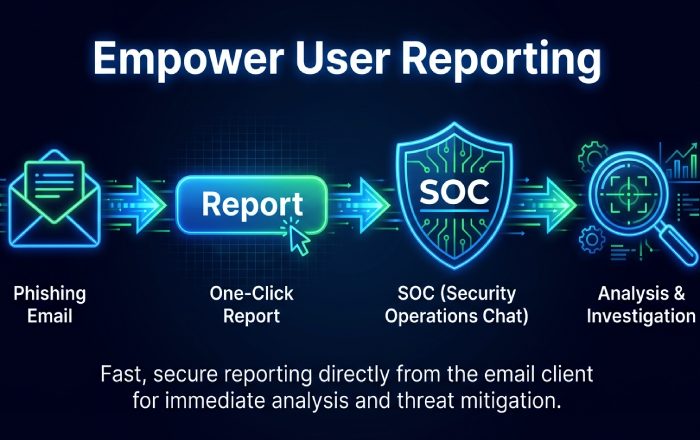
Encourage users to report suspicious emails via the Report Message add-in; these submissions feed classifiers, anti-phishing policies, and threat policies. Security teams can escalate to Microsoft for analysis and tune phishing policies accordingly. For advanced hunters, query email events using Kusto Query Language (KQL) via Microsoft Defender XDR, then correlate with endpoints, identities, and cloud apps to streamline incident response across the Defender Suite.
Allow/Block and coexistence done right: Tenant Allow/Block List, Advanced Delivery (simulations and trusted senders), and avoiding dangerous transport rule bypasses
Tenant Allow/Block List for precise control
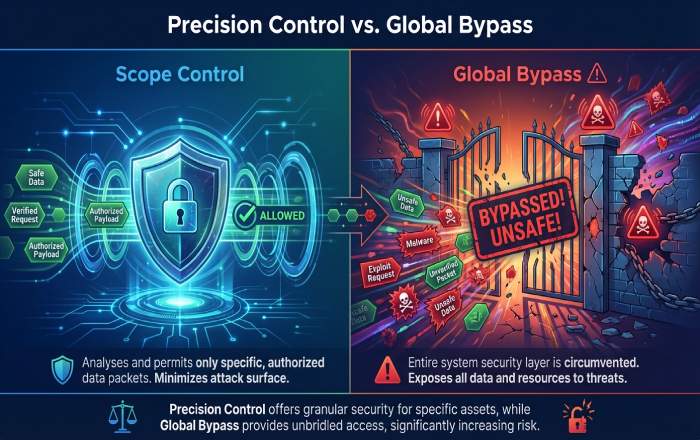
Use the Tenant Allow/Block List to manage sender domains, URLs, and file hashes with precision instead of global bypasses. This approach protects anti-phishing protection and preserves the efficacy of Safe Links, Safe Attachments, and anti-phishing policies while enabling coexistence scenarios and partner mail flows. Maintain least privilege in Office 365 security, especially for priority accounts.
Advanced Delivery for simulations and trusted senders
Configure advanced delivery policy for attack simulation training (e.g., Microsoft Defender for Office 365 payloads) and known trusted senders (ticketing, CRM, or bulk tools). This ensures training mail lands correctly without disabling O365 phishing protection for cloud mailboxes. Combine with proper mail flow connectors, connection filtering, and exchange mail flow rules to preserve authentication and filtering integrity across hybrid environments.
Avoiding the risky transport rule bypasses
Do not add blanket “bypass spam filtering” transport rules or allow broad sender wildcards. Instead, combine authenticated senders, ARC support, and scoped allow and block entries with DMARC-aligned email authentication. This protects anti-phishing protection posture, keeps threat policy settings enforceable, and sustains Office 365 security controls at scale.
Empowering people and measuring impact: Attack Simulation Training, Report Message add-in, awareness KPIs, and Secure Score improvement actions
Build resilient behavior with Attack Simulation Training
Attack Simulation Training in Microsoft 365 delivers realistic phishing payloads, credential harvests, and malware tests without weakening Defender for Office 365. Measure click rates, report rates, and dwell time, and use tailored security training to close gaps. Integrate with Teams protection so simulations and awareness nudges land in Microsoft Teams where appropriate.
Promote reporting through the Report Message add-in
The Report Message add-in operationalizes user-to-SOC reporting, fueling submissions and improving O365 phishing protection through continuous model learning. Pair with preset security policies, Safe Links, Safe Attachments, and anti-phishing policies updates that reflect user feedback, and reference security documentation to keep guidance current.
KPIs and Secure Score improvement
Track awareness KPIs, Secure Score improvement actions, and compliance-aligned metrics to guide investments. Use configuration analyzer and security recommendations to prioritize changes, from tightening threat policies to enhancing email authentication. Schedule periodic security updates and publish step-by-step guides for delegated administration so changes land consistently across regions and business units.
Monitoring and operations: dashboards and reports, message trace and mail flow, alert tuning, and SIEM/Sentinel integration for SOC workflows
Dashboards, reports, and message trace
Leverage Microsoft Defender for Office 365 dashboards and reports to track detections, submissions, quarantine, and Safe Links/Attachments performance. Use message trace to validate delivery, policy actions, and authentication results across cloud mailboxes. Tie insights back to threat policies and security policies to maintain continuous monitoring.
Alert tuning, alert policies, and SOC workflows
Rationalize alert policies to reduce noise while preserving fidelity for priority accounts and high-risk events. Build triage playbooks that move from alert to Threat Explorer to AIR, with audit log search for evidence collection and incident response. Align with zero-trust principles, ensuring repeated verification before releasing messages from quarantine.
SIEM and Microsoft Sentinel integration
Forward detailed email security logs into Microsoft Sentinel for correlation with Windows, Azure, and SaaS telemetry. Use out-of-the-box analytics for Microsoft Defender, and enrich with Microsoft Copilot for Security to accelerate investigation summaries and response planning. This integration bridges Office 365 security with enterprise SOC processes and supports cloud organizations at scale.

Governance and continuous hardening across the Defender Suite
Lifecycle of threat policies and continuous validation
Review threat policy settings quarterly: adjust phishing policies, anti-phishing policies, Safe Links, and Safe Attachments as attacker tradecraft evolves. Validate with targeted simulations and KQL hunting; embed results into security recommendations and Secure Score to raise the baseline across Office 365 security.
Integrations across Microsoft Defender solutions
Unify signals in Microsoft Defender XDR to correlate email threats with host telemetry from Microsoft Defender for Endpoint, identity anomalies from Microsoft Defender for Identity, and app risk from Microsoft Defender for Cloud Apps. Extend visibility with Microsoft Defender for Cloud, Microsoft Defender Vulnerability Management, Microsoft Defender for Business, Microsoft Defender for IoT, and Microsoft External Attack Surface Management to protect identities, endpoints, cloud apps, and infrastructure together.
Operational guardrails and ownership
Define delegated administration for regional teams, maintain runbooks as step-by-step guides, and publish security documentation for repeatability. Establish change windows for mail flow connectors and exchange mail flow rules, and require pre-deployment testing. Consistent governance keeps anti-phishing protection and O365 phishing protection strong while evolving with the threat landscape.
Key Takeaways
- Enforce SPF, DKIM, and DMARC alignment with ARC to block spoofing while preserving downstream filtering.
- Use Advanced Delivery and Tenant Allow/Block List instead of risky mail flow bypasses to maintain anti-phishing protection.
- Operationalize Threat Explorer, AIR, and user submissions to speed investigations and quarantine decisions.
- Drive culture change with attack simulation training, Report Message add-in, and Secure Score improvement actions.
- Integrate Defender for Office 365 with Microsoft Sentinel and Defender XDR to unify monitoring and incident response at scale.